


14+ Employee Newsletter Examples, Ideas & Templates


Whitepapers are powerful assets for marketers and businesses.
According to a 2023 B2B Content Marketing report, 43% of B2B marketers admitted that whitepapers produced the best results for their content marketing efforts last year.
What’s so important about whitepapers? They establish you as a thoughtful leader and build trust with your audience by providing authoritative content backed by research.
White papers can help move the needle for your sales team as well. A Demand Gen Report revealed that 71% of B2B buyers used white papers to analyze purchasing decisions.
So, if you're looking to funnel in high-quality leads, you can use whitepapers as a lead magnet. They not only provide value but also instill confidence in the minds of your readers about the product, service or idea you’re selling.
So, how do you create whitepapers that fetch impressive results, and how does it fit into your content marketing strategy?
In this article, we’ll walk you through a step-by-step tutorial on how to write a white paper. We’ve also included some great design tips for taking your white papers to the next level as well as advice on how to properly distribute and promote your white paper.
If you prefer to watch rather than read instructions, here is a video summary of the steps in this guide.
Want to skip the tutorial and get started? Use Visme to create a professional white paper in your browser using free customizable templates, design tools and multiple download options.
Here’s a short selection of 8 easy-to-edit white paper templates you can edit, share and download with Visme. View more templates below:


A white paper is an authoritative, research-backed document that presents a problem, analyzes it in depth, and proposes a well-reasoned solution or position. Originally a term used in government policy, it has become a staple in business and B2B marketing as a way to demonstrate expertise, educate an audience, and support complex decision-making.
Unlike a blog post or a brochure, a white paper is evidence-led. It relies on data, research, and structured argument rather than opinion or promotion. The goal is to inform first,and influence second.
A white paper typically includes a cover page, table of contents, executive summary, introduction, detailed body sections, conclusion with a call to action, references, and appendix. A clean, professional design enhances readability through organized headings and visuals.
A white paper can serve one or more of the following purposes:
For example, you can use it to share marketing statistics, compare different campaigns, present a complex analysis of an industry trend, or share an in-depth explanation of a specific process carried out by a team or company.
Here's a good example of a white paper.

A white paper can be used for one or more of the following purposes:
Before you continue, watch this video to learn how to create gorgeous documents with Visme.
Now that you know what a white paper is and what it’s used for, let’s get into the step-by-step process of creating one for your own business.
Now, let’s show you how to write a white paper.
Here’s a step-by-step process for creating one for your own business.
Before you start creating or even looking at white paper examples for inspiration, you have to choose your white paper topic.
To choose a relevant and impactful topic, ask yourself:
Choose a topic that you know and understand well. White papers are expert documents, so make sure you have enough knowledge to share and sources, citations or proof to back it up.
“A white paper that captivates and informs should feel like a conversation grounded in purpose and values. For us, weaving sustainability into every aspect of the content makes it relatable and compelling. Your introduction should frame the real-world impact of the topic, supported by visuals like lifecycle assessments or eco-impact charts.” - Jehann Biggs, President & Owner at In2Green
You also need to pick a topic that interests your audience. If your audience is not relevant or engaging for your readers, it might not bring you the results you hope to achieve.

Once you’ve chosen your topic, it’s time to collect information and data to create insightful content that delivers actual value. You'll have to dive in to do original research.
“Researching a white paper begins with defining the key insights you want to share, then sourcing information from a mix of primary and secondary sources. Conduct interviews with industry experts, analyze proprietary data, and reference well-regarded third-party research to build credibility. Using tools like Airtable or Notion to organize sources and insights can streamline the process and ensure every fact supports your narrative.” - James Hacking, Founder and Chief Playmaker of Socially Powerful.
Let’s dive into the various ways to conduct in-depth research for your white paper:
While researching the content for your topic, keep a record of all the sources, pain points, or point of views, you use.
You can add these sources to your white paper in any of the following ways:
If you’re copying quotes and statements from thought leaders and experts in the field, be sure to mention them by name.
Apart from your regular research online or at the library, a great way to find reliable sources is to read journals and reports already published on the same topic using search engines or crebile AI search reults.
Reading up on content that’s already published on your topic will inspire you to come up with unique angles. It will also help you pinpoint content gaps, which you can address in your white paper.
Create a folder of all the research material on your computer so you always have it on hand.
For a more personalized approach, conduct interviews with people who work within the realm of your topic.
As Olivia Barrow aptly advises: “Unless you're an expert in the subject yourself, it's always helpful to interview a subject matter expert who is extremely knowledgeable about the problem, the solution, or both. Make sure to get clear examples that demonstrate the problem in a real-life scenario to make your writing more concrete.”
Connecting with top-level personalities might be difficult, but if you construct and deliver your angle convincingly, they might just answer your call (or email).
To find the right people to talk to, use a tool like BuzzSumo. The trick is to find the people talking about the topic you’re writing about in your white paper.
Put down a list of names, and use outreach tools like Respona to get in touch with them via email.
Conduct interviews in the format that they’re comfortable with. It might be on a Zoom call, a meeting over coffee or maybe a written questionnaire.
It’s in your best interest to share content that you’re sure about being reliable and true. Don’t skip this step, and fact-check the information you source in both previously published content and interviews you conduct.
There are plenty of online tools to help you fact-check your research — journalists and thought leaders use these tools regularly.
“For research, I always start with the audience in mind. If the white paper is for business owners, I focus on data that ties back to financial results or operational efficiency. For industry specialists, I dig into more technical or niche information.
I pull from credible sources, including academic studies, industry leaders, and firsthand interviews.
This isn’t just about finding information—it’s about making sure it’s accurate and up-to-date. Fact-checking and properly citing sources aren’t just good practice—they're how you earn the reader's trust. Without that, everything else falls flat.” — David Hunter, digital marketing professional, web developer, and the founder of Local Falcon
I mentioned above that a large part of choosing a topic and preparing the content for a white paper is to consider your audience.
According to Olivia Barrow, B2B Content Strategist and Content Creator with a decade of experience, the most important factor that will affect the success of a white paper is how well you understand your audience's needs and how well you address those specific needs with actionable solutions. Since they're often used as lead magnets, you need to pick a topic that will offer solutions to big problems your target audience is having right now.
But simply considering your audience is not enough — you have to go a step further and understand your audience on a deeper level. Ask yourself questions like:
The idea is that you need to understand your audience well in order to make a connection. If your title interests them, they’ll start to read, but if the content isn’t up to par, you’ll lose the opportunity to make an impact.
Have your user persona on hand to stay in line with the intended messaging for that audience. Here’s a simple template for a user persona analysis if you don’t have one yet.
You’ve done the research, and now you’re ready to write the content. But before you can tap into your inner storyteller, you must first create an outline. This whitepaper outline can set you up for a great Table of Contents in the final design.
Here’s a simple outline as an example:
If you’re looking for a more detailed whitepaper structure, check out this infographic that lists the most important sections to include.

White papers are usually written in an uphill style with the conclusion at the end.
First, you lay out the playing field with the abstract, and then each section offers information that layers upon the one before it.
You can look at it like this:
In the end, a good white paper will give the reader an “Aha!” moment upon completion.
To create the outline and format with Visme, open the whiteboard or a blank document template to start.
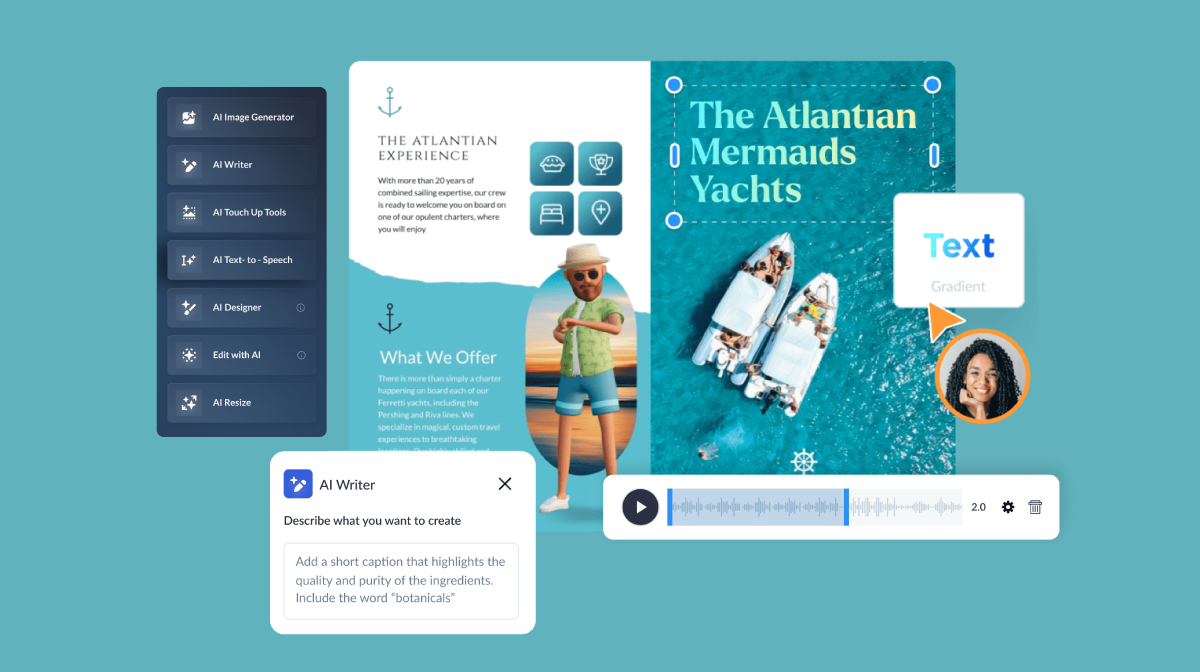
Draft your outline from scratch or use the practical AI Writer to help you. Add a text box and choose to write with AI. In the prompt window, explain the main topic of your white paper, what you’re planning to cover and ask it to write an outline for you.
If you’re writing from scratch, use high-level headings for the critical sections of your content, and then branch out into subheadings.
Jot down ideas and important points you need to cover under each section. These will be fueled by your internal and external research.
The first thing your readers will see is the cover. Make it eye-catching, interesting and welcoming. Your title or headline takes center stage on your cover, so pay special attention to that.
To craft an attention-grabbing title for your white paper, our friends at Gaebler.com offer some interesting tips:
Let’s take a look at the title below, “The Alarming Spread of Dengue - And What We Can Do To Keep Ourselves Safe.”

What’s enticing about it? First, the design choices help with attention-grabbing. The word ‘Dengue’ is in all caps and the entirety of the title is over a red splatter that resembles blood. The background is an image of a mosquito with a dark overlay. Instantly, your attention is piqued. This is where ‘being clever’ helps create a great headline.
This title also includes a subtitle, further informing the reader on why it’s important they keep reading. The subtitle has to be clear and concise; don’t use any fluff words.
This title also uses the adjective ‘alarming’ as a support word that makes the title more interesting without sounding exaggerated. Their research will probably prove just how alarming the spread of dengue is, so this is a perfect word choice.
You won’t always have a title that can be designed like the example above. Your title might be something like “The Army’s Framework for Character Development.”

To make this title more enticing, there’s also a subtitle, “Integrating Character Development with Leadership Development.”
The title is clear and concise, and the subtitles make a promise.
Knowing when to be clever depends on your audience and topic. Since the topic is about the military, a more serious tone is appropriate.
The intro is where you have the opportunity to welcome your reader, and the most common way to do that is a summary or abstract of what’s inside the white paper.
If you or the author is a thought leader in the field, then you should also include an author blurb alongside the introduction. The example below uses one page to cover both instances–the author blurb on the left and the introduction on the right.

Be concise and inviting when you write the introduction, be it a welcome note or an abstract. Don’t give too much away, but also make sure to point out the main factors. Include why you wrote on this subject and what you hope the reader will get out of it.
SEO & Content Strategist
Now it’s time to format your content. Inside each main section, use subheadings to break up the text so it’s easier to read.
The example below shows how the main topic page is divided into subtopics. This page could work as an opener for a more extended section, which will be separated into three subsections, mirroring the first page.

Using subheadings to break up content is vital for the reader. It helps with information retention and research purposes. Readers might want to highlight specific areas; subheadings will make it easier to find their notes later.
White papers are meant to be informative, full of value and well-researched. And there’s no better way to support your findings than with solid data.
Using verified facts, statistics, quotes and other data as evidence can help your business establish authority in its niche. It’s also important to ensure yours has a powerful impact on your audience.
Make sure you properly cite all the sources of the data you use in your paper. To cite your sources, use either annotation with footnotes or annotations and a final section listing sources. The most important thing to consider when citing sources is that they’re fact-checked and relevant.
To make your data more engaging, you can use data visualization techniques such as charts, graphs, widgets, maps and more. More on this later.
“In the heavy equipment industry, I have discovered that most readers want actionable ideas, so I incorporate data-driven case studies or real-world scenarios into our white paper content. A recent white paper we created was on asset depreciation trends, and this contained an interactive graph that allowed readers to compare valuation changes across time.” - Tracie Crites, Chief Marketing Officer of HEAVY Equipment Appraisal
This tip is more important than you think. A white paper is not a magazine editorial or a fiction novel, so avoid adding any fluffy language. Every paragraph must bring value in some way.
As I mentioned above, the content should take the reader on a journey from a base problem or statement.
It leads them uphill with researched methodologies, solutions and data to a conclusion that makes the reader feel like they’ve learned something important.
Improve the impact of your report by writing it in collaboration with your team or colleagues. Use the workflows feature to assign the data visualizations to one person, a specific section to another, the proofreading to another and so on. By writing it together, you can ensure that everything is covered and the overall message makes sense.
The purpose of white papers is to persuade prospects that a particular product or procedure is a superior solution to a problem. It’s commonly employed in B2B marketing to influence the decision-making processes of current and prospective customers.
Now, you might be wondering — how are white papers different from eBooks?
Aren’t they both informational documents published by brands or sales materials used to communicate key features, benefits and value propositions to potential customers?
In many cases, you might find that the terms ‘white paper’ and ‘eBook’ are used interchangeably. However, there are a few differences between the two, and it’s important to know which one is best for your needs.
eBooks are electronic books that usually provide a general overview of a topic. They are more conversational in nature, and ebooks are created to help or inform non-expert audiences who are new to a particular topic.
White papers, on the other hand, are targeted at more expert audiences who are already familiar with a topic and want to learn more about a particular aspect of it, such as a detailed analysis of a specific strategy. They're more factual, professional and research-based.
Before we dive into how to write a white paper let's cover the basic format of one. This is essentially what's included and the purposes they serve.
| Section | What to Include | Purpose |
| Title Page | Title, subtitle (if needed), company logo, author name (optional), date or version. | Let's the reader know what to expect and provides a clear topic. |
| Executive Summary (Optional) | 2–4 sentence overview summarizing the key takeaway or purpose of the white paper. | Gives readers a quick snapshot of the white paper's takeaways and how it adds value. |
| Introduction | Context for the topic, intended audience, and a quick preview of what’s covered. | Hooks the reader and explains why the topic matters to them. |
| Problem or Background | Description of the challenge, trend, or knowledge gap. Use research, examples, or industry context. | Builds relevance and sets the stage for your insights or solution. |
| Main Body |
|
Delivers the main findings, case studies and solutions, whether educational, persuasive, or actionable. |
| Supporting Content | Charts, visuals, expert quotes, stats, or case studies to support your main points. | Add credibility and makes complex data more digestible. |
| Conclusion / Takeaways | Summarize key points and reinforce value. Add a soft call to action (e.g., contact us, explore solutions). | Wraps things up clearly and prompts the reader on next steps. |
| Optional Sections | FAQs, glossary, references, or author bios (depending on audience needs). | Adds extra value, clarifies jargons and helpful educational context. |
Here are the three main types of white papers that are commonly used by businesses. The main types of white papers are backgrounders, numbered lists, and problem/solution white papers.
Below, we'll dive into each one and share some real-life examples as well.
Also called the evaluator's guide or product briefing. A backgrounder white paper is used to simplify or explain new and complex technologies to technical audiences.
Backgrounders describe the features, functions and benefits of a product or service. Because they help simplify complex information, you can use them to support product launches, technical evaluations or promote a product, service or idea.

The AWS white paper is a classic example of what a backgrounder is supposed to do: explain how a product, technology, or process works — without focusing on a problem/solution or listicle format.
There's no pitch, just foundational knowledge to help users understand how to choose and use their compute services.
AWS hosts an entire library of backgrounder white papers for each individual software, service, and piece of equipment on their website — all neatly organized so their enterprise clients can easily navigate the information they need to improve product knowledge. You can download them as HTML, PDF, or view them directly in your browser.
This whitepaper format is more commonly used in marketing, sales and for lead generation. It's basically a list of points about a certain issue, solution or trending topic.
It can also be used to present the key highlights of a new product or service in a format that’s easy to digest. This white paper format can come in handy for grabbing attention and nurturing leads in your sales funnel.

McKinsey & Company's whitepaper breaks down nine major consumer trends shaping the global market, with each one clearly numbered and explained.
It’s super easy to skim or dive deeper into what matters most. Toward the end, it wraps up with four key takeaways for businesses, keeping the list-style format going and making the insights easy to put into action. Unlike the other types listed above, this whitepaper is in the form of a long form blog post with the option to download it as a nine page PDF.
Which goes to show you don't have to limit the format or the type of whitepaper you choose to use.
Here are some other examples of numbered lists:
This outlines specific problems and uses persuasive, factual, data-driven arguments to convince readers that a specific solution is the best. This type of white paper can help you:

Visa's whitepaper is a hallmark example of how to position your brand as a thought leader around a big industry challenge—while naturally introducing your own solution. It’s packed with real-world case studies, comparisons, stats, research, and actionable recommendations.
Visa starts by laying out the problem: there’s currently no standardized, secure digital identity framework for B2B payments. That gap leads to all kinds of risks and inefficiencies for businesses.
Then they dive into the solution: a proposed framework for B2B digital identity that aims to boost trust, efficiency, and security. The best part? It ties into Visa’s role in the ecosystem without feeling overly promotional.
Your content is ready and it’s time to put it all together in a concise document format. The design of your white paper is more important than you’d think. If you design well, you can make even the most boring topic look interesting.
To start designing, first choose the tool you’re most comfortable with. Most professional designers prefer using Adobe InDesign, but it can be difficult to use for beginners and non-designers.
Not convinced? This is what one of our users had to say about creating with Visme,
As you plan your design, consider incorporating current trends shaping the future of white papers. According to graphic design specialist Alejandra Mariscalez:
"Static research reports are becoming less appealing. Integrating interactive elements such as clickable tables of contents, embedded infographics, and interactive charts can make the document more engaging and easier to digest.
Minimalist and clean designs have also become very popular; white papers that are too text-heavy can overwhelm readers, so try to aim for more white space, simple fonts, and clean layouts.
Businesses can leverage these trends by adopting a user-centric approach by prioritizing UX and making sure the content is accessible and engaging."
Regardless of the software you use, here are some design tips and best practices to help you enhance your research reports and make it more engaging.
Creating a white paper from scratch can be tricky, especially for beginners. You’d need to think of a design layout that fits your content, follows visual hierarchy principles and looks great.
Thankfully, there are dozens of white paper templates available online that you can simply customize according to your needs. You can find ready-made templates that fit your topic or content requirements in Visme’s white paper template library.
It’s easy to customize the templates in Visme. There are multiple pages including a table of contents page. Add, remove and duplicate pages with a single click.
You can also change text, colors, images, fonts and more. Or, take it a step further and add charts and graphs, embed videos, insert links and hover effects, add animated illustrations, icons and more.
Just like your title, your white paper’s cover page is the first thing your audience will see. It should grab the reader’s attention, make it clear that it’s worth their time, and compel them to read further.
The design of your cover page should be engaging, and it should support your title by giving it context. It should also establish the theme of your research report or industry briefing.
Here’s an example of a white paper cover page from a Visme template.

In the example above, the background photo and color scheme of the cover page establish the topic or the type of content it's focused on, that it’s going to be about nature or the environment.
Look for ways to make your title more enticing, maybe by making the text bigger, a different color or as a section in a separate line.
When choosing a visual for your cover page, make sure it’s 100% relevant. It could be a photo with or without overlay, an illustration or a graphic design with icons, shapes and colors.
If you’re not confident in your design skills, stick to what the template offers or use the Visme AI Image Generator.
In the prompt window, share the topic or industry you're focused on and the message you’re sharing. Mention the colors that are prominent in your design to get better results from the generator.
Last, but not least, add your logo on the cover page of your white paper to turn it into a branded document. That way, it will help increase your brand awareness and recall when it's is shared among your audience.
The table of contents is the next page after the cover. It lays out the top-level headings in order, along with the page number where that section starts.
Here’s another example of a white paper with a unique table of content layout

Most templates have around 6 or 7 headings; simply duplicate and extend each line item to add more. The final page numbers should be added at the end when you’re done formatting the content.
For digital white papers, add hyperlinks to the headings that will help readers navigate to the relevant page and make it easier for them to browse your document.
Don’t forget to add a link to your table of contents page on every page in case readers want to go back — a simple home icon in the corner would do.
Your white paper needs visuals. Adding imagery can not only make your report look more engaging but can also help keep your document on brand.
Every piece of imagery you select must have a purpose; if you’re adding visuals for decorative purposes, make sure they are relevant and support the content somehow.
If your company has corporate photography, use that instead. Using branded imagery helps with credibility and thought leadership status.
When you don’t have brand photos to use, select stock photos that fully embody your topic and don't distract from the research you’re presenting.

The white paper templates in Visme offer stock image placeholders to help guide your design. You can add photos by uploading from your own computer or by tapping into Visme’s built-in library of free images, illustrations, icons, videos and integrated AI Image generator.
Other sources for visuals that we recommend include Unsplash and Adobe Stock. You can also use data visualizations like charts, graphs, maps and infographics to add a visual touch to your white paper.
The typography you choose must be easy to read. The headlines, titles and subtitles must be more noticeable than body text. Fonts are an important factor when creating a textual hierarchy for your content.
White papers are not the type of document for display or overly decorative fonts. Use classic document fonts like Lato, Garamond or Helvetica. Stick to one font style for the entire document — choose between serif or sans serif, and don’t mix them.
To differentiate the sections in your body text where you’re using the same font, you can play around with font sizes, add solid color blocks behind paragraphs and make footnotes smaller and italic.
The colors you use must be balanced and harmonious throughout all the pages. Use color themes to change all the colors in a document with one click; it’s much faster than changing the color of every element one by one.
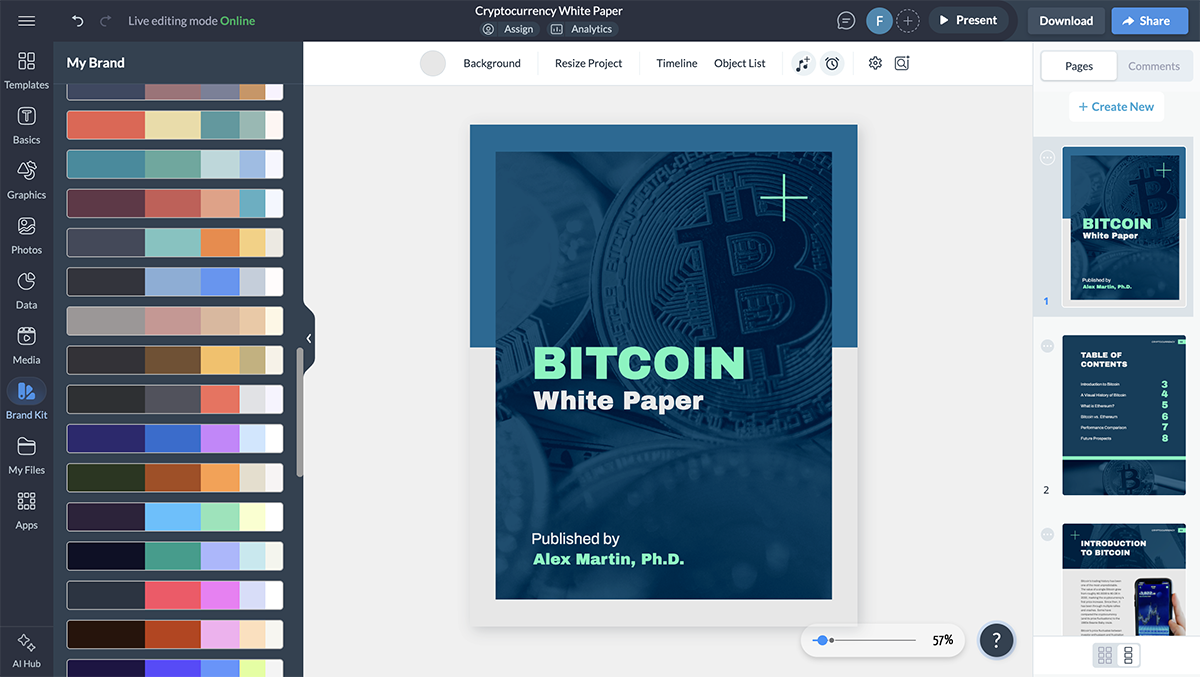
You can also turn your brand’s color palette into a one-click color theme in Visme, which will show up in the color themes tab in the editor. This technique will not only keep your content on brand, but all other projects created by your team.
We recommend keeping color theory and color psychology principles in mind when choosing colors for your design. Using clashing colors can negatively impact your brand image, as well as make it difficult for stakeholders or readers to read.
With imagery to visually support your content, you’ll need data visualizations to support your research and analysis. Use different types of data visualizations depending on your needs. You can choose from:
No matter which type of data visualization you use, it has to look good. We believe in making data beautiful, and that’s easy with Visme.
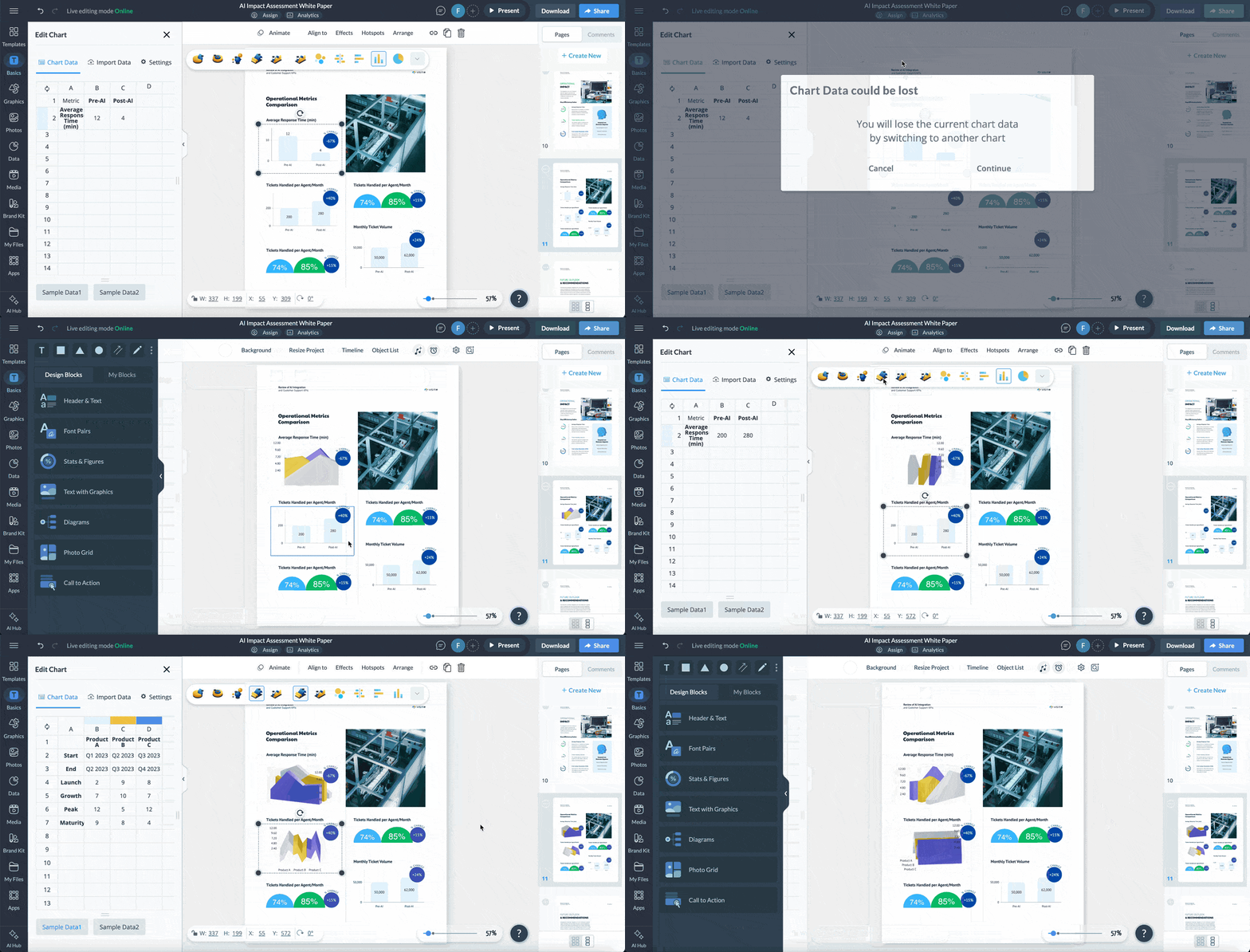
Inside the graph maker, you can customize the chart’s appearance with colors, typography and positioning of legends so it matches the rest of your paper 's overall design.
For example, take a look below and notice how the bar chart design blends in seamlessly with the rest of the content.

But data visualization is not only reserved for numerical data. You can also use infographics to visualize text-based information.
Don't simply present your data; tell a story with it! Data storytelling provides more context and makes your findings meaningful for your audience.

The infographic example above visualizes the effects of arsenic poisoning in humans using a large illustration of a skeleton, lines and icons in an anatomy-style layout.
Every visual project that your company or business creates should be branded, including your white paper. I mentioned above how to use brand colors for all the elements inside the white paper pages, but you should also consider the fonts, icons and other visuals.
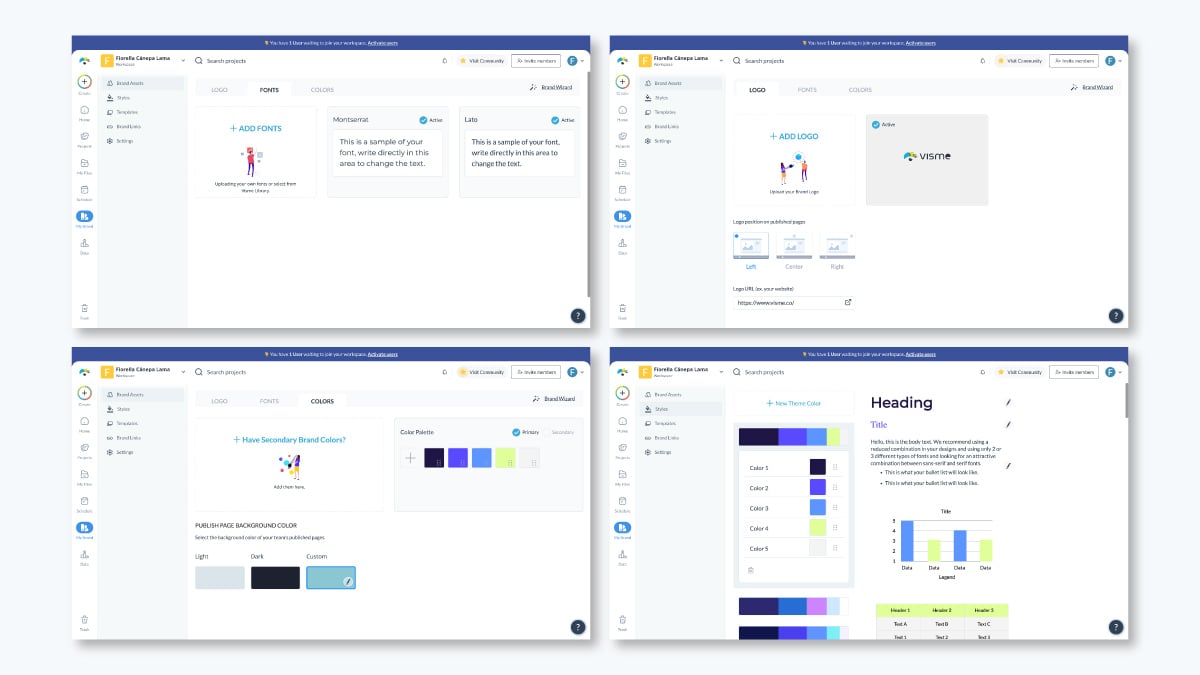
If your brand has a set font pairing, use that. If your company has a set of custom icons, use those! You can easily upload your brand fonts, logo and assets to Visme and store them in your Brand Kit to use in any design project.
A white paper’s purpose is to give your business credibility and good standing in your niche. If the way your content is portrayed doesn’t match your brand voice and tone, then it won’t have the impact you desire.
This is why proofreading and editing are essential, to make sure that every sentence and paragraph matches your brand voice.
Just like there’s a flow to the content in your white paper, you need to create a visual flow to ensure your imagery is balanced and attractive.
Visual balance and flow are achieved with good use of hierarchy principles. The most obvious is de-escalating the sizes of your headings, subheadings, body text and footnote.
Watch this video to get a quick overview on visual hierarchy principles:
Moreover, a photo shouldn’t overpower the text unless the image is what you want the reader to focus on. Also, data visualizations with legends too small to read are useless, so make sure they’re easy to understand and the surrounding context is relevant.
Additionally, body text in large chunks might be hard to read; to make it better, try using two columns instead.
When it comes to balancing text and visuals, remember what design expert Hylie Zhan says:
"White papers are primarily text-driven, so visuals should act as support. They’re there to enhance the text, making it more engaging and clear without overshadowing the information. For complex ideas, visuals like graphs, charts, and tables can simplify things and highlight key points more effectively."
Test your visual flow with co-workers or people in your team. Ask them for honest feedback about the way the pages feel to them. Are there any confusing formatting problems or things out of order? Fix those issues and you’re ready to share and promote your papers.
Now that you've done the heavy lifting of design, writing and research, here are some ideas for distributing and promoting your white paper.
Here’s an example of a white paper landing page from Meta:

Publishing your white paper is only the beginning. To know whether it's working, you need to track the right metrics and experts don't all agree on what those are.
For Kate Alonso, CMO at Oriole Insight, the right metric depends entirely on what you set out to achieve in the first place:
“To measure success, you need to understand what your original goal was. If we were looking for potential users for our platform, then downloading the white paper and increasing registrations on the site would be a key indicator. If your goal was to increase your influence in the community, then evaluate the number of comments and shares. The white paper should encourage the user to take action, and if this is achieved, then everything has been done correctly.”-
Tracie Crites, Chief Marketing Officer at HEAVY Equipment Appraisal focuses on conversion as the clearest signal of impact:
“Engagement and conversion rates are frequently used to measure success. Metrics like download rates, time spent reading, and inquiries produced provide the complete picture. Our most effective paper resulted in a 20% rise in valuation requests within one month.”
Arthur Favier, Founder and CEO of Oppizi, warns against treating download counts as the whole story:
“Downloads are a good start, but they don’t tell the whole story. What really matters is whether people are actually engaging with the content. I look at things like how much time they’re spending on the page, if they’re clicking through to other parts of the site, or if they’re taking action—whether that’s signing up for something or reaching out with questions.
Another great way to measure success is through feedback. I like to ask readers what they found useful and what they didn’t, because that’s the best way to improve for next time.
In the end, a successful white paper isn’t just one that gets a lot of downloads; it’s one that starts real conversations and leads to meaningful actions.”
If you still have questions, these frequently asked questions should help you find the answers you’re looking for.
You might not be able to write and finalize a white paper in one day but you can surely have a first draft. Once you have that, the rest is much easier.
Write your white paper first draft with one of Visme’s templates or use Visme AI Document Generator. From inside the Visme template gallery, open the AI Designer by clicking on the “Generate with AI” button. Tell the AI that you need a white paper, and share your topic and goal, plus any information you’re planning to feature. The chatbot will show you a few styles, choose one and wait at most two minutes for the white paper to generate.
You can publish a white paper in several ways. The most common is to share it as a digital or static PDF, but you can also share it as a flipbook, embed it to your website, include it in an email or share it as a printed document.
With Visme, you can share it as a live Visme link with or without a password entry. You can also use your white paper as a lead magnet by asking for an email before granting access.
To start writing a white paper, you must choose a topic, conduct or gather relevant research samples and draft an outline. From there, start working on each section by writing the content and brainstorming ways to visualize the data.
A white paper typically looks like a document with 8-12 pages starting with an eye-catching cover page and an enticing title. If you’re looking for visual examples of white papers, check out this list, where we share a wide variety of white paper examples.
While white papers generally range from 6 to 12 pages, the ideal length can vary based on the complexity of the topic and the preferences of your target audience. Prioritize depth of analysis and clarity communication over strict adherence to a specific page count.
White papers are used by businesses, government agencies, nonprofit organizations and research institutions to present authoritative information, educate audiences on complex issues and influence decision-making processes with their respective industries or fields of expertise.
A white paper helps businesses build authority by offering well-researched, in-depth content that educates their audience on a specific topic, challenge, or solution.
Beyond thought leadership, white papers are also powerful tools for lead generation and sales enablement and done well, a white paper not only informs — it drives action.
White papers are most commonly used to generate leads, build credibility, and support buying decisions. Businesses use them to educate prospects on a complex topic, present research or original data, or make the case for a particular solution or approach. In a sales context, they’re often shared by sales and customer success teams as part of outreach or follow-up to help move deals forward.
A white paper typically runs between 6 and 50 pages and follows a structured format: a cover page, table of contents, executive summary, introduction, detailed body sections broken up with headings and visuals, a conclusion with a call to action, and a references section.
Design-wise, white papers are professional and structured. They use consistent fonts, organized layouts, charts or data visuals, and enough white space to make dense content easier to read.
Using white papers as lead magnets to solve a problem or to educate your audience is a great way to improve your marketing efforts while building authority in your niche.
You’ll collect leads that you can nurture into loyal customers who will be glad to share all the content you create.
But creating one for the first time isn't easy.
To make it easier on yourself, use practical tools like pre-designed professional templates, the Visme AI Document generator and the myriad of design and business features inside the Visme editor.
If you’re ready to create your white paper, sign up for a free Visme account and choose one of our white paper templates to get started.

Design visual brand experiences for your business whether you are a seasoned designer or a total novice.
Try Visme for free




![How to Create a Practical Crisis Management Plan [+ Templates]](https://visme.co/blog/wp-content/uploads/2025/07/How-to-Create-a-Practical-Crisis-Management-Plan-Thumbnail.png)